Full description of QuickBar
QuickBar is a browser extension designed to save time every day. It adds a quick-access bar directly inside the browser, allowing users to find their favorite websites, work tools, useful widgets, and several smart features in just a few clicks, without interrupting their browsing.
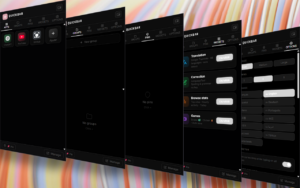
The extension is organized around a clear interface with several tabs : Apps, Groups, Pins, Widgets and Options. These sections make it possible to customize your workspace, add shortcuts, group several websites, pin important pages, and quickly access built-in tools. This structure is visible in the main QuickBar popup interface.
QuickBar can be used as a permanent sidebar displayed on web pages. The code shows that it is automatically injected on HTTP/HTTPS pages, with a dedicated width and position management on the left, right, or top. It even includes an automatic mode that can move the bar to the right on certain websites that already have a left sidebar, such as Notion, Discord, Slack, Figma, Claude, or ClickUp.
Main features
Quick-access sidebar
QuickBar adds a discreet sidebar that lets users quickly open their favorite apps, websites, and tools without having to search through bookmarks or open several menus. It works like a small dashboard available while browsing.
The sidebar uses the extension’s themes and can visually adapt to several styles: black, white, red, dark, light, midnight, neon blue, green, purple, orange, pink, lo-fi, futuristic, gold, forest, or ocean. These themes are defined in the sidebar and popup code.
Custom apps
Users can create their own shortcuts to their favorite websites. QuickBar also offers quick suggestions such as Gemini, YouTube, GitHub, Notion, X/Twitter, Discord, Twitch, Gmail, Google Drive, Spotify, Reddit, and LinkedIn..
Each app can be customized with a name, URL, color, and emoji. The extension also retrieves website favicons to display shortcuts in a more readable and visual way.
Shortcut groups
QuickBar allows several apps to be grouped into folders or groups. This is useful for separating different uses: work, social networks, streaming, music, creative tools, development, and more.
A button also makes it possible to open an entire group at once, which can be useful, for example, to automatically launch all the websites needed for a work or streaming session.
Pins / pinned pages
QuickBar includes a Pins section for pinning important pages. This makes it easy to keep a specific page, dashboard, document, admin interface, or any other regularly used URL close at hand. The interface includes a button to pin the current page.
Built-in widgets
The extension includes a widget gallery. According to the popup, the available widgets include :
- Translation with Google Translate, described as supporting 98 languages and automatic detection.
- Correction with LanguageTool for spelling and grammar.
- Browsing stats with top sites and hourly activity for the day.
- YouTube Dislikes to display a dislike counter.
- Games with Snake and Clicker.
- Wikipedia with instant search and summaries.
- Clipboard with history, search, and a 20-entry limit.
Text correction and translation
QuickBar includes a floating corrector and a translation tool. The corrector.js file indicates a correction/translation interface capable of detecting the language, analyzing the text currently being typed, and offering an “Apply” action. The correction widget also shows a visible 1,000-character limit in the interface.
Smart tools for selected text
When text is selected on a page, QuickBar offers quick actions such as ask, improve, explain, summarize, correct grammar, shorten, expand, continue writing, or translate. The code includes the preparation of a prompt that can be sent to Gemini.
Command palette with Ctrl+K
QuickBar includes a command palette accessible with Ctrl+K or Cmd+K. It lets users quickly search for an action, navigate to a website, launch a command, copy the page URL or title, manage tabs, go to the top or bottom of the page, switch to fullscreen, or act on selected text.
Built-in commands include opening YouTube, Spotify, Google, Gmail, GitHub, Reddit, or Twitch, as well as enabling Picture-in-Picture, toggling the sidebar, opening settings, controlling media playback, reloading the page, duplicating the tab, or translating/correcting selected text.
Picture-in-Picture and floating media player
QuickBar offers a Picture-in-Picture mode that allows a video to be detached into a small floating window. The PiP button is visible directly in the extension header.
The extension also includes a floating mini media window for Spotify and YouTube. It displays the title, artist or channel, cover/thumbnail, progress, and provides play/pause, previous, and next buttons. This window can be moved, and its position is saved.
The service worker also shows that QuickBar looks for active Spotify or YouTube tabs to retrieve the current media state and send actions such as play/pause, previous, or next.
YouTube improvements
QuickBar includes several YouTube-related features. The code injects a specific script on YouTube and retrieves the number of dislikes through the Return YouTube Dislike API.
The extension modifies the display of the dislike button to show a more readable value.
Clipboard history
QuickBar can save the history of copied text. The clipboard widget indicates a 20-entry limit, with options to search, copy, delete, or pin items according to the widget interface.
The command palette also temporarily keeps copied text in memory so it can be quickly accessed from Ctrl+K.
Visual customization
Users can change QuickBar’s appearance: theme, contrast, icon size, number of columns, language, dark/light/auto browser mode, corrector activation, sidebar activation, clipboard activation, and floating media window. Several themes are available, and some appear to be unlockable through the Clicker mini-game.
Google account synchronization
The popup includes an Account & Sync section allowing users to sign in with Google to synchronize QuickBar across several PCs. The service worker also includes the Google login flow through chrome.identity.
Multilingual
QuickBar is translated into several languages. The files show translations for French, English, Spanish, German, Italian, Portuguese, Russian, Japanese, Chinese, Korean, Arabic, Turkish, and Dutch.